Wedding Photo Sharing Apps vs. QR Code Galleries
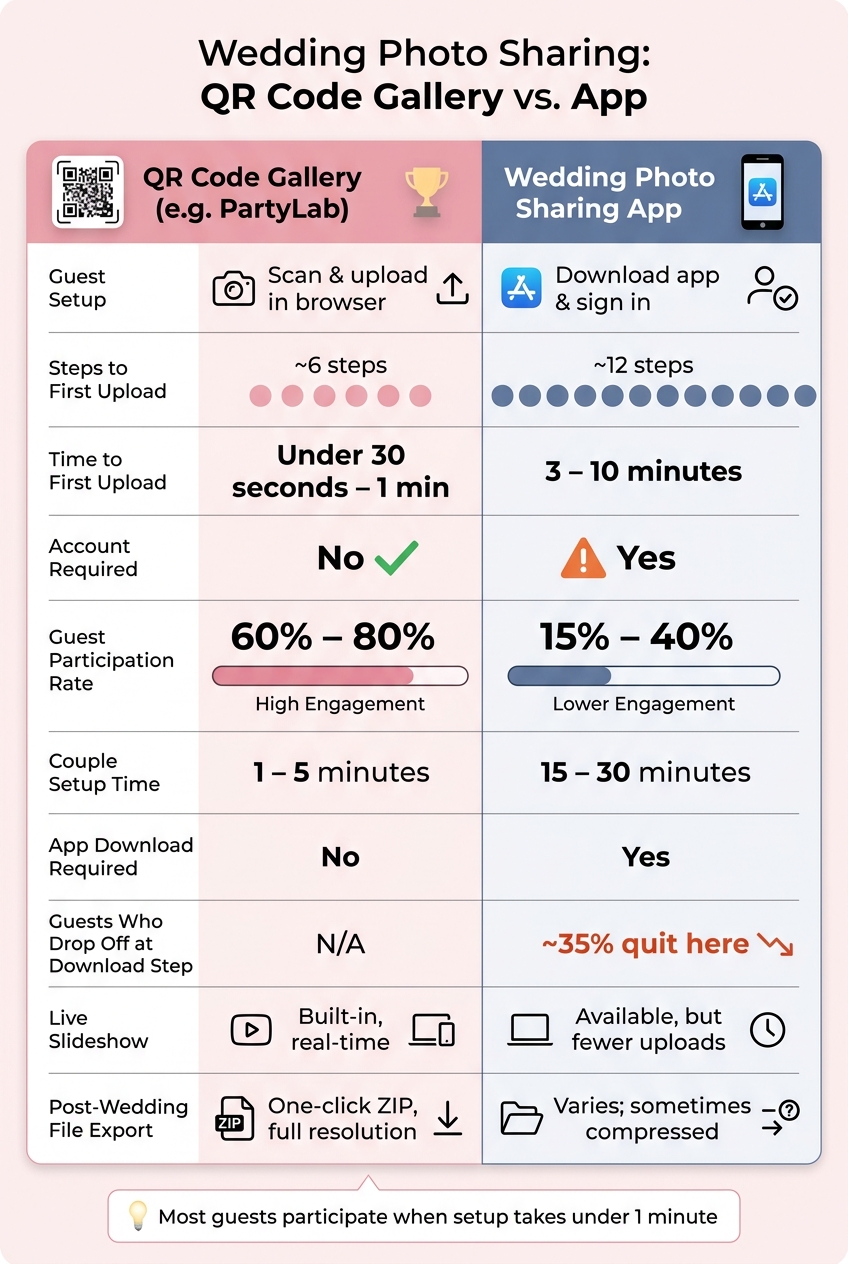
If I want the most guest photos with the least friction, I’d pick a QR code gallery. Guests are far more likely to upload when they can scan and share in under a minute, instead of going through an app download, sign-up, and permissions flow that can take 3 to 10 minutes.
Here’s the short version:
- Apps ask more from guests: download, install, account setup, email checks, and permissions
- QR galleries cut steps: scan, open in a browser, choose files, upload
- Participation is usually higher with QR: about 60% to 80% vs. 15% to 40% for apps
- Apps can still fit some weddings: mainly if I want all-in-one planning tools or offline upload queues
- PartyLab focuses on ease: printed QR codes, live slideshow, guestbook messages, and a one-click ZIP download of original files
For most weddings, the main question is simple: will guests bother to upload at all? If the answer depends on an app install, many won’t. If the answer is just “scan this code”, more people usually join in.
Wedding Photo Sharing: QR Code Gallery vs. App - Key Stats & Steps
How To Create a QR Code To Share Wedding Photos (Step By Step)
sbb-itb-46c9b96
Quick Comparison
| Criteria | QR Code Gallery | Wedding Photo Sharing App |
|---|---|---|
| Guest setup | Scan and upload in browser | Download app and sign in |
| Time to first upload | Under 30 seconds to 1 minute | 3 to 10 minutes |
| Steps | About 6 | About 12 |
| Account needed | No | Usually yes |
| Participation | 60% to 80% | 15% to 40% |
| Live reception use | Strong for instant uploads and slideshows | Works, but fewer uploads can limit it |
| Post-wedding downloads | Browser access and ZIP export | Varies by app |
| Best fit | Mixed-age guest lists, low-friction sharing | Guests who don’t mind app setup |
If I were choosing based on ease, upload rate, and getting all the files back after the wedding, the QR gallery option is usually the simpler path.
How wedding photo sharing apps work and where they slow guests down
Steps guests take from invite to first upload
With app-based sharing, guests often go through about 12 steps before they can upload their first photo: see the invite or signage, open the app store, search, download, install, sign in, verify email, enter the event code, grant permissions, find their way around the app, and then upload.
That’s a long path for something that should feel simple. And every extra step gives people a chance to drop off.
The biggest sticking point is often the download itself. That one step causes 35% of guests to quit the process, and only 15–25% of guests usually make it all the way through the full flow of downloading, signing up, and uploading. In plain terms, most guests never get to the part where they actually share photos.
Where apps can work well for weddings
That said, app-based sharing does have strong points when the setup fits the crowd. Organized albums, push reminders, and account-based storage are real pluses. Some apps also offer an offline upload queue, so guests can pick photos even without cell service and the app syncs later when the connection comes back. That can help at remote venues with weak reception.
For couples whose guests are comfortable using apps, this route can still work well. It’s often a better fit when the main goal is tidy storage and follow-up reminders, not getting the highest possible share rate from guests. Those perks matter a lot less, though, when people are trying to upload in the middle of a busy reception.
Common problems with app downloads on the wedding day
Wedding-day conditions make all those extra steps harder than they sound. Reception Wi-Fi is often overloaded. Some guests don’t have enough phone storage to install anything at all. And for older guests, especially those 70 and up, app-based sharing can see participation rates as low as 5–15%.
That’s the heart of the problem. At a wedding, asking people to download an app, verify their email, and approve permissions is often too much. Guests are far more likely to share when it feels easy and immediate, not when it feels like setting up a new account.
That’s exactly the kind of friction QR code galleries cut out.
How QR code galleries work with PartyLab
PartyLab uses a browser-based wedding gallery. Couples set up the event, print a QR code, and let guests upload without downloading an app. That’s the big draw here: the guest flow is simple at the reception, with no app install and no account setup.
Guest experience: scan, open, and upload in a browser
A guest scans the QR code from a table card, ceremony program, or welcome sign, and the gallery opens right in the phone’s browser. No app. No account. From there, guests choose photos or videos from their library and upload them in the browser.
QR scanning is built into iOS 11+ and Android 8+ devices, which covers nearly every smartphone guests are likely to have.
PartyLab features that matter at a wedding
As guests upload, photos and videos show up in a real-time gallery that can run as a full-screen slideshow on TVs or projectors during the reception. Guests can also leave digital guestbook messages and react to each other’s photos.
For planning and for after the wedding, couples get:
- Printable QR codes
- Guest email collection with CSV export
- A one-click ZIP export of all originals
PartyLab plans, upload limits, and access windows
The plan details mostly change three things: guest count, upload volume, and how long the gallery stays open.
| Plan | One-time price (USD) | Guests | Uploads | Storage | Maximum file size | Upload and download access |
|---|---|---|---|---|---|---|
| Starter | $44.99 / event | Up to 100 guests | 2,000 | 25 GB | 250 MB | 3 months |
| Plus | $89.99 / event | Up to 500 guests | 10,000 | 100 GB | 500 MB | 1 year |
| Max | $179.99 / event | No guest cap | 50,000 | 1 TB | 1 GB | 1 year |
Starter works well for small weddings. Plus makes sense for mid-size events. Max is a better fit for large or multi-day celebrations. One practical note: download the ZIP before the access window closes.
Next, compare that guest flow with app-based sharing on effort, privacy, and post-wedding access.
Wedding photo sharing apps vs. QR code galleries: side-by-side comparison
The differences show up most clearly in three moments: when guests first join, while the reception is happening, and later when the couple wants every photo and video in one place.
Guest onboarding steps and couple setup time
The biggest split is guest effort. With a QR gallery, guests usually just scan the code, pick files, and upload. With an app-based option, they often need to find the app in the App Store or Google Play, install it, create or log into an account, and approve permissions. That extra work matters when you have a lot of guests.
| Feature | QR Code Gallery (PartyLab) | Wedding Photo Sharing App |
|---|---|---|
| Install required | No | Yes (App Store / Google Play) |
| Account required | No | Yes |
| Step count | ~6 steps | ~12 steps |
| Time to first upload | Under 30 seconds | 3–10 minutes |
| Couple setup time | 1–5 minutes | 15–30 minutes |
That gap doesn't just affect convenience. It also shapes how many guests bother to upload at all.
Participation, privacy, and live reception use
Participation rates are where the difference gets hard to ignore. QR code galleries average 60–80% guest participation, while app-based methods usually fall between 15–40%.
Privacy works differently too. A QR gallery is private by default because only guests with the code can open it or upload to it. App-based platforms often ask for broader photo-library permissions. During the reception, that matters. PartyLab's built-in slideshow updates in real time, so new uploads can appear right away. On app-based platforms, lower participation often means the live slideshow feels a bit sparse.
| Feature | QR Code Gallery (PartyLab) | Wedding Photo Sharing App |
|---|---|---|
| Upload friction | Low (browser-based) | High (app-store barrier) |
| Likely participation | 60–80% | 15–40% |
| Privacy approach | Private QR/link; no account needed | Account-based; broader library permissions often required |
| Live slideshow | Built-in, real-time | Available, but lower participation means a thinner live slideshow |
| Instant updates | Opens in the browser | Instant after login |
The final gap tends to show up after the reception ends, when the couple wants to gather, download, and sort every file.
Post-wedding access and file ownership
After the wedding, the main issue is how easy it is to get the files back out. PartyLab offers a one-click ZIP export in full resolution. Some app-based platforms handle this less simply, requiring individual downloads inside the app and, in some cases, compressing photos by up to 70%.
Access works differently as well. With an app-based setup, couples may need to keep the app installed. With a QR gallery, the gallery stays available through a browser link, with no login needed.
The aim is simple: one complete gallery of candid photos and videos. When retrieval is easier, getting there is easier too.
| Feature | QR Code Gallery (PartyLab) | Wedding Photo Sharing App |
|---|---|---|
| Guest access after event | Via browser link, no login needed | Must keep app installed |
| Original file export | One-click ZIP, full resolution | Varies; sometimes compressed |
| Time-limited access | 3 months to 1 year (plan-dependent) | Varies by subscription |
| Download convenience | High | Moderate |
Which option fits your wedding best
After looking at setup, guest effort, privacy, and access after the wedding, the choice usually comes down to one thing: how much friction your guests will put up with.
When an app-based approach may still make sense
An app-based setup can still be a good fit in a few cases:
- Single-platform coordination: If you want photo sharing to sit next to your wedding website, RSVPs, and guest messaging in one place, an app can keep it all together.
- Unreliable venue connectivity: Apps can queue uploads and send them later when a guest gets back online. That helps at remote venues with weak service.
- Guest interaction features: If you want likes, comments, and activity feeds, an app gives you that extra social layer that a browser-based gallery often doesn’t.
If your guests are fine with downloading an app, that setup can work well. If not, browser-based upload usually gets more people to take part.
When PartyLab is the better choice
For most weddings, the easier path leads to more uploads.
PartyLab is often the better fit for mixed-age guest lists and for couples who want more candid photos without extra steps. Browser-based upload removes the download hurdle completely. Guests scan a code, open the gallery in their phone browser, and upload without installing anything.
Final takeaway: simple, app-free wedding photo sharing
Apps can add structure, but they also add friction. In most cases, the better option is the one guests can use in seconds: scan a QR code, upload from any phone browser, and get back to the reception.
FAQs
Do guests need to create an account to upload wedding photos?
No. Guests do not need to make an account or download an app to upload photos.
With a QR code gallery, they just scan the code using their smartphone camera. That opens a secure browser page where they can upload photos straight from their device.
No sign-ups. No passwords. No app store detours.
Will a QR code gallery still work if my venue has weak cell service?
Yes. A QR code gallery can still work with weak cell service because many browser-based photo sharing tools can queue uploads in the background.
If a guest loses connection during an upload, the files usually keep waiting and finish sending when the signal gets better. That means photos and videos might show up in the live gallery a bit later, not right away.
Even so, the upload can still go through once service comes back - or after guests get home and reconnect to Wi-Fi or a stronger cell signal.
How long should I keep my wedding gallery open after the event?
Starter includes 3 months of upload and download access. Plus includes 1 year of upload and download access. Max includes 1 year of upload and download access. Download your files before access ends; downloaded copies are yours to keep.